Developer Guide
- Acknowledgements
- Setting up, getting started
- Design
- Documentation, logging, testing, configuration, dev-ops
- Appendix: Requirements
-
Use cases
- Use case: UC01 - Add student
- Use case: UC02 - Edit student
- Use case: UC03 - Delete student
- Use case: UC04 - List students
- Use case: UC05 - Find students
- Use case: UC06 - Search for students
- Use case: UC07 - View student
- Use case: UC08 - List tutorial slots
- Use case: UC09 - Create a tutorial slot
- Use case: UC10 - Delete a tutorial slot
- Use case: UC11 - Add student to tutorial slot
- Use case: UC12 - Delete student from tutorial slot
- Use case: UC13 - Search for students
- Use case: UC14 - List attendances
- Use case: UC15 - Mark attendance
- Use case: UC16 - Unmark attendance
- Use case: UC17 - Add assignment
- Use case: UC18 - Delete assignment
- Use case: UC19 - Set submission
- Use case: UC20 - Export data
- Non-Functional Requirements
- Glossary
-
Appendix: Instructions for manual testing
- Launch and shutdown
- Adding a student
- Listing all students
- Deleting a student
- Listing tutorial slots
- Adding a tutorial slot
- Adding students to tutorial slot
- Deleting a student from a tutorial slot
- Deleting a tutorial slot
- Adding an assignment
- Deleting an assignment
- Listing submissions
- Set submission status
- Listing attendances
- Marking attendance
- Unmarking attendance
- Searching for students
- Exporting student contact list
- Retrieve and Save to file
- Appendix: Planned Enhancements
Acknowledgements
TAskbook is a brownfield software project based off AddressBook Level-3, taken under the CS2103 Software Engineering module held by the School of Computing at the National University of Singapore.
- Java Dependencies
- Documentation
Setting up, getting started
Refer to the guide Setting up and getting started.
Design
 Tip: The
 .puml files used to create diagrams in this document docs/diagrams folder. Refer to the PlantUML Tutorial at se-edu/guides to learn how to create and edit diagrams.
Architecture
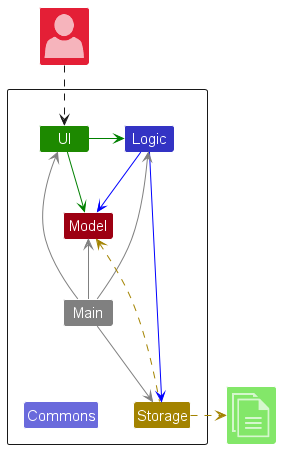
The Architecture Diagram given above explains the high-level design of the App.
Given below is a quick overview of main components and how they interact with each other.
Main components of the architecture
Main (consisting of classes
Main
and MainApp)
is in charge of the app launch and shut down.
- At app launch, it initializes the other components in the correct sequence, and connects them up with each other.
- At shut down, it shuts down the other components and invokes cleanup methods where necessary.
The bulk of the app’s work is done by the following four components:
-
UI: The UI of the App. -
Logic: The command executor. -
Model: Holds the data of the App in memory. -
Storage: Reads data from, and writes data to, the hard disk.
Commons represents a collection of classes used by multiple other components.
How the architecture components interact with each other
The Sequence Diagram below shows how the components interact with each other for the scenario where the user issues the command delete 1.
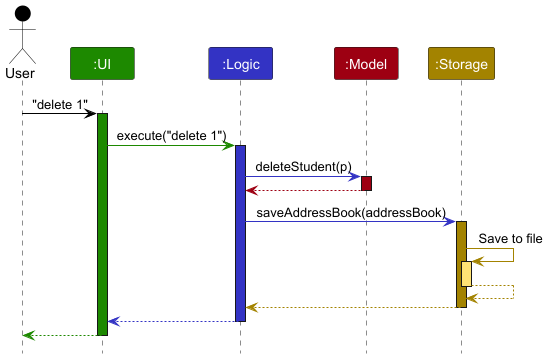
Each of the four main components (also shown in the diagram above),
- defines its API in an
interfacewith the same name as the Component. - implements its functionality using a concrete
{Component Name}Managerclass (which follows the corresponding APIinterfacementioned in the previous point.
For example, the Logic component defines its API in the Logic.java interface and implements its functionality using the LogicManager.java class which follows the Logic interface. Other components interact with a given component through its interface rather than the concrete class (reason: to prevent outside component’s being coupled to the implementation of a component), as illustrated in the (partial) class diagram below.
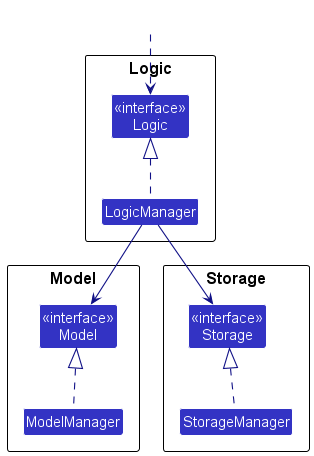
The sections below give more details of each component.
UI component
The API of this component is specified in Ui.java
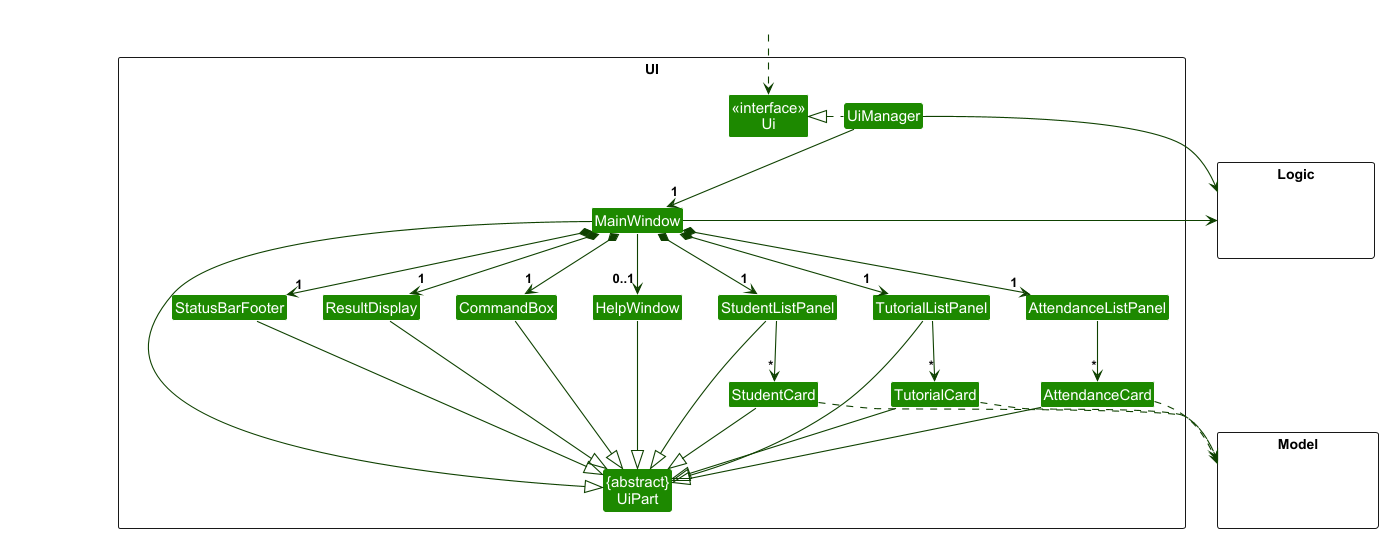
The UI consists of a MainWindow that is made up of parts e.g.CommandBox, ResultDisplay, StudentListPanel, TutorialListPanel, AttendanceListPanel, StatusBarFooter etc. All these, including the MainWindow, inherit from the abstract UiPart class which captures the commonalities between classes that represent parts of the visible GUI.
The UI component uses the JavaFx UI framework. The layout of these UI parts are defined in matching .fxml files that are in the src/main/resources/view folder. For example, the layout of the MainWindow is specified in MainWindow.fxml
The UI component,
- executes user commands using the
Logiccomponent. - listens for changes to
Modeldata so that the UI can be updated with the modified data. - keeps a reference to the
Logiccomponent, because theUIrelies on theLogicto execute commands. - depends on some classes in the
Modelcomponent, as it displaysStudentobject residing in theModel.
Logic component
API : Logic.java
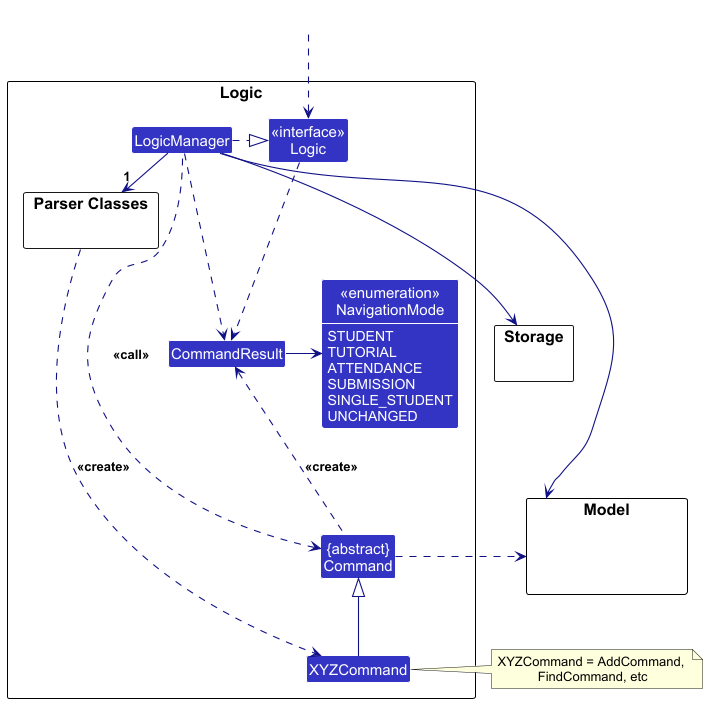
Here’s a (partial) class diagram of the Logic component:
The sequence diagram below illustrates the interactions within the Logic component, taking execute("delete 1") API call as an example.
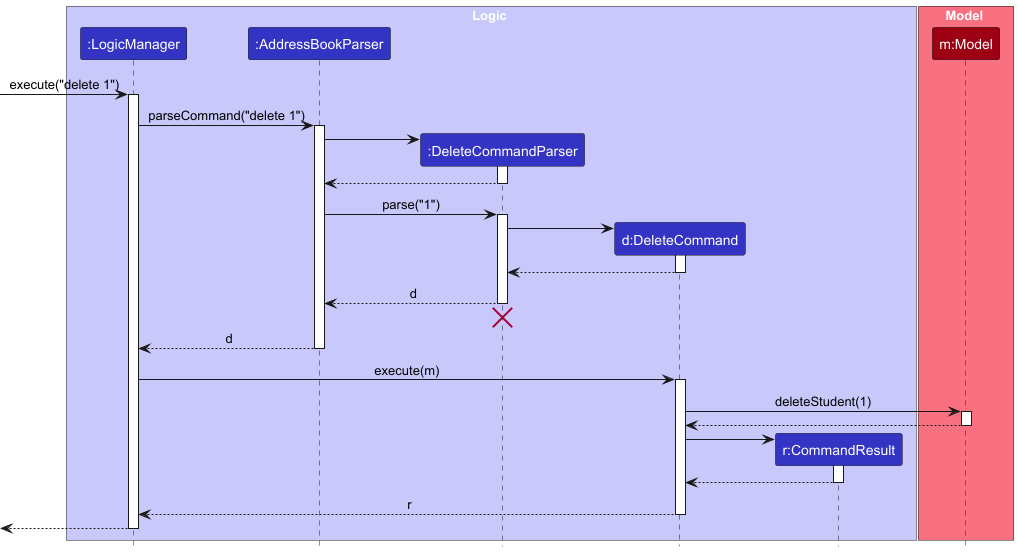
 Note: The lifeline for
 DeleteCommandParser should end at the destroy marker (X) but due to a limitation of PlantUML, the lifeline continues till the end of diagram.
How the Logic component works:
- When
Logicis called upon to execute a command, it is passed to anAddressBookParserobject which in turn creates a parser that matches the command (e.g.,DeleteCommandParser) and uses it to parse the command. - This results in a
Commandobject (more precisely, an object of one of its subclasses e.g.,DeleteCommand) which is executed by theLogicManager. - The command can communicate with the
Modelwhen it is executed (e.g. to delete a student).
Note that although this is shown as a single step in the diagram above (for simplicity), in the code it can take several interactions (between the command object and theModel) to achieve. - The result of the command execution is encapsulated as a
CommandResultobject which is returned back fromLogic.
Here are the other classes in Logic (omitted from the class diagram above) that are used for parsing a user command:
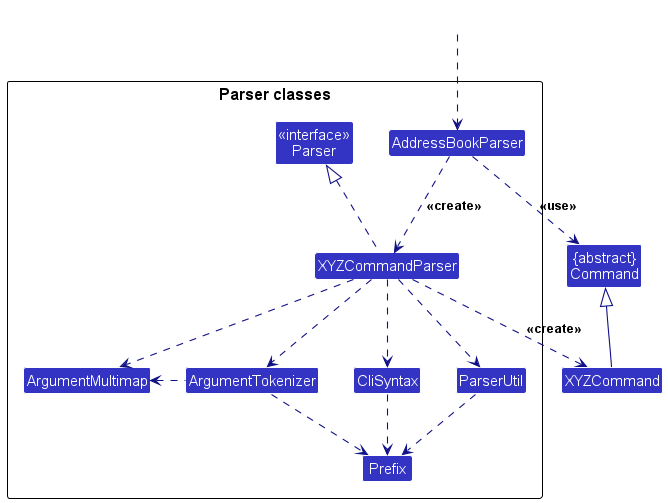
How the parsing works:
- When called upon to parse a user command, the
AddressBookParserclass creates anXYZCommandParser(XYZis a placeholder for the specific command name e.g.,AddCommandParser) which uses the other classes shown above to parse the user command and create aXYZCommandobject (e.g.,AddCommand) which theAddressBookParserreturns back as aCommandobject. - All
XYZCommandParserclasses (e.g.,AddCommandParser,DeleteCommandParser, …) inherit from theParserinterface so that they can be treated similarly where possible e.g, during testing.
In addition to having simple single-word command,
our app supports commands with subcommands (e.g. tutorial add, tutorial delete).
Our implementation is similar to that of a Recursive Descent Parser.
Here is a (partial) diagram showing how the recursive parsing works,
using the TutorialParser as an example
(classes not involved are omitted):
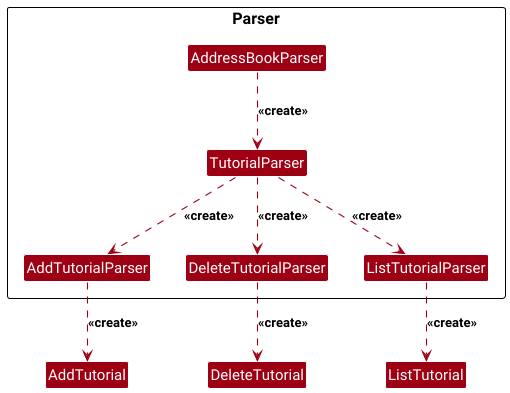
How the parsing works:
- The
AddressBookParserwill match the first word, and match against aCommandobject, or anotherParserobject- The algorithm terminates if it maps to a
Commandobject.
- The algorithm terminates if it maps to a
- If it maps to a
Parserobject, then it will callParser#parseof that object- The
parsemethod will map the next word to either aCommandorParserobject. - The process repeats recursively until it eventually resolves to a
Commandobject.
- The
Model component
API : Model.java
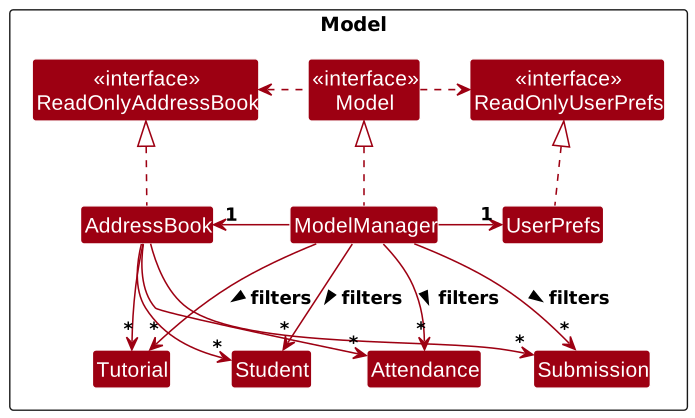
(Implementation within the addressbook will be discussed in another section)
The Model component,
- stores the address book data,
Student,Tutorial,AttendanceandSubmission. - stores the currently ‘selected’
Student,Tutorial,AttendanceandSubmissionobjects (e.g., results of a search query) as a separate filtered list which is exposed to outsiders as an unmodifiableObservableList<Student>that can be ‘observed’ e.g. the UI can be bound to this list so that the UI automatically updates when the data in the list change. - stores a
UserPrefobject that represents the user’s preferences. This is exposed to the outside as aReadOnlyUserPrefobjects. - does not depend on any of the other three components (as the
Modelrepresents data entities of the domain, they should make sense on their own without depending on other components)
AddressBook Component
The above diagram shows how the AddressBook class, and ModelManager classes interact with
the Tutorial, Student, Attendance and Submission class.
This section will describe the interaction between these classes.
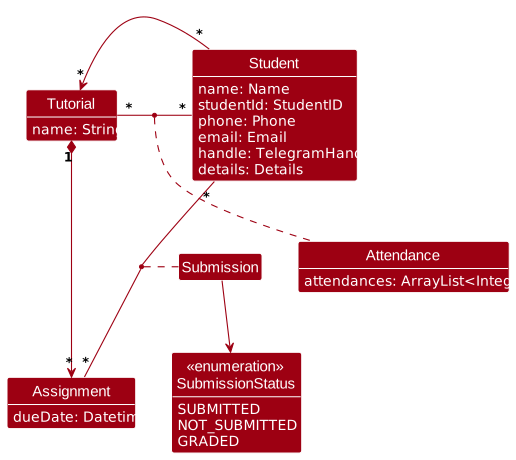
In the AddressBook class,
between each (Student, Tutorial) Pair,
there is one Attendance object.
Each Attendance object stores an array of integers,
where the ith index represents the i‘th lesson,
and the value in the ith index could be 0 or 1,
representing whether the student was present during that lesson.
Between each (Assignment, Student) pair,
there is a Submission object.
In each Submission object is an enum that represents the submission status of that assignment,
for a particular student.
Storage component
API : Storage.java
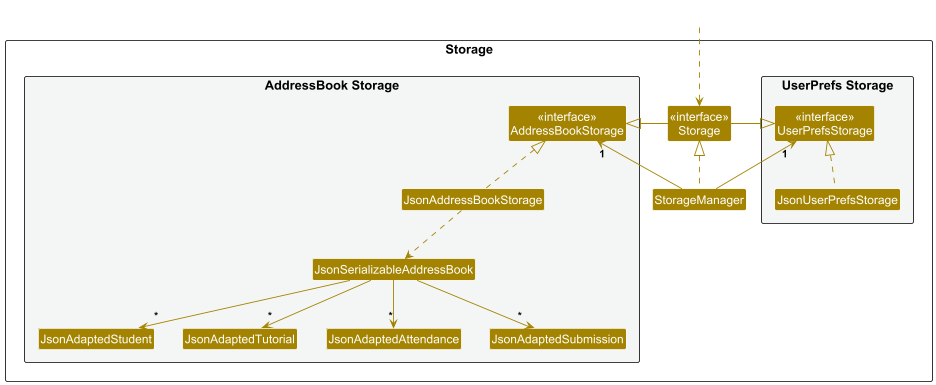
The Storage component,
- can save both address book data and user preference data in JSON format, and read them back into corresponding objects.
- inherits from both
AddressBookStorageandUserPrefStorage, which means it can be treated as either one (if only the functionality of only one is needed). - depends on some classes in the
Modelcomponent (because theStoragecomponent’s job is to save/retrieve objects that belong to theModel)
Common classes
Classes used by multiple components are in the seedu.address.commons package.
Documentation, logging, testing, configuration, dev-ops
Appendix: Requirements
Product scope
Target user profile:
-
is a teaching assistant (TA) in higher education
- manages a significant number of student contacts
- assists professors in coursework and attendance
- tutorials
- assignments
- prefer desktop apps over other types
- is reasonably comfortable using CLI apps
- prefers typing to mouse interactions
- can type fast
Value proposition: manage TA student contacts & administrative tasks faster than a typical mouse/GUI driven app
User Stories
| Priority | As a … | I want to … | So that I can … | Accepted? |
|---|---|---|---|---|
| High | TA | Add a student’s data | Find their details to contact them if needed | Yes |
| High | TA | View a list of all students | See all students I have created | Yes |
| High | TA | Delete a student’s data | Make space for the next semester’s class | Yes |
| Medium | TA | Edit a student’s data | Make changes to students without deleting and adding them again | Yes |
| Medium | TA | Search for student’s data entry using name | Locate students efficiently | Yes |
| Medium | TA | Add notes to each student | Track important details like consultation requests, special accommodations, and weaknesses | Yes |
| Medium | TA | View the student’s data in detail | See more information about the student | Yes |
| High | TA | Create tutorials | Manage the tutorial groups I am in charge of | Yes |
| High | TA | View a list of all tutorials | See all tutorials I have created | Yes |
| High | TA | Delete tutorials | Remove outdated groups | Yes |
| High | TA | Add students to tutorials | Manage them on a tutorial group level | Yes |
| High | TA | Delete students from tutorials | Remove them or reassign them to the appropriate tutorials | Yes |
| Medium | TA | Search for tutorial’s data entry using name | Locate tutorials efficiently | Yes |
| High | TA | Create an assignment entry with a deadline | Track assignments to a tutorial | Yes |
| High | TA | Delete an assignment entry | Remove assignments or reassign assignments to appropriate tutorials | Yes |
| Medium | TA | Set the submission state for an assignment for specific students | Track which students have completed which assignments | Yes |
| Medium | TA | View assignment submissions across students and tutorials | Monitor completion rates | Yes |
| High | TA | Mark and unmark my students’ attendances for any of the weeks | Track their attendance | Yes |
| High | TA | List attendance records for students across tutorials | Review past attendance to tutorials | Yes |
| Medium | TA | Export a list of all students or students in a specific tutorial | Keep records of students or share information with professors | Yes |
| Medium | TA | Export a list of all tutorials | Have an organized record of tutorial groups | Yes |
Use cases
(For all use cases below, the System is the TAskbook and the Actor is the user, unless specified otherwise)
Use case: UC01 - Add student
System: TAskbook
Actor: User
MSS
- User sends request to System to create student
- System creates a new user
- Use case ends
Extensions
- 2a. If input is erroneous
- 2a1. System displays an error message
- 2a2. Use case resumes at step 1
Use case: UC02 - Edit student
System: TAskbook
Actor: User
MSS
- User requests to list students
- System shows a list of students
- User sends request to edit a specific student index in the list with details to edit
- System edits a new user
- Use case ends
Extensions
- 3a. If input is erroneous or user does not exist
- 3a1. System displays an error message
- 3a2. Use case resumes at step 3
Use case: UC03 - Delete student
System: TAskbook
Actor: User
MSS
- User requests to list students
- System shows a list of students
- User requests to delete a specific student index in the list
- System deletes the student
- Use case ends
Extensions
- 3a. If the given index is invalid
- 3a1. System shows an error message
- 3a2. Use case resumes at step 1
Use case: UC04 - List students
System: TAskbook
Actor: User
MSS
- User requests to list students
- System lists all students
- Use case ends
Extensions
- 2a. If there are no students
- 2a1. System doesn’t display anything
- 2a2. Use case ends
Use case: UC05 - Find students
System: TAskbook
Actor: User
MSS
- User sends search request for students by name with or without a specific tutorial
- System lists all students matching the request
- Use case ends
Extensions
- 2a. If there are no students
- 2a1. System doesn’t display anything
- 2a2. Use case ends
Use case: UC06 - Search for students
System: TAskbook
Actor: User
MSS
- User requests to search for a student
- System prompts for search criteria
- User enters the search criteria
- System displays a list of students matching the search criteria
- Use case ends
Extensions
- 3a. If no students match the search criteria
- 3a1. System displays a message indicating no results found
- 3a2. Use case ends
Use case: UC07 - View student
System: TAskbook
Actor: User
MSS
- User requests to list students
- System shows a list of students
- User requests to see a specific student’s details based on student index
- System displays specified student’s details (including unlisted details like description).
- Use case ends
Extensions
- 3a. If the given index is invalid
- 3a1. System shows an error message
- 3a2. Use case resumes at step 1
Use case: UC08 - List tutorial slots
System: TAskbook
Actor: User
MSS
- User requests to list tutorial slots
- System lists all tutorial slots
- Use case ends
Extensions
- 2a. If there are no tutorial slots
- 2a1. System doesn’t display anything
- 2a2. Use case ends
Use case: UC09 - Create a tutorial slot
System: TAskbook
Actor: User
MSS
- User requests to create tutorial slot
- System creates a new tutorial slot
- Use case ends
Extensions
- 2a. If tutorial slot already exists
- 2a1. System shows an error message
- 2a2. Use case continues at step 1
- 2b. If tutorial slot name is invalid
- 2b1. System shows an error message
- 2b2. Use case continues at step 1
Use case: UC10 - Delete a tutorial slot
System: TAskbook
Actor: User
MSS
- User requests to delete tutorial slot
- System deletes specified tutorial slot
- Use case ends
Extensions
- 2a. If specified tutorial slot doesn’t exist
- 2a1. System shows an error message
- 2a2. Use case ends
- 2b. If tutorial slot name is invalid
- 2b1. System shows an error message
- 2b2. Use case continues at step 1
Use case: UC11 - Add student to tutorial slot
System: TAskbook
Actor: User
MSS
- User lists all students
- System lists all students
- User sends the command to add students to tutorial slots
- System adds the students to the respective tutorial slots
- Use case ends
Extensions
- 2a. If user doesn’t list students first
- 2a1. System shows an error message
- 2a2. Use case continues at step 1
- 3a. If user inputs invalid information
- 3a1. System shows an error message
- 3a2. Use case continues at step 1
Use case: UC12 - Delete student from tutorial slot
System: TAskbook
Actor: User
MSS
- User lists all students
- System lists all students
- User sends the command to delete students from tutorial slots
- System deletes the students from the respective tutorial slots
- Use case ends
Extensions
- 2a. If user doesn’t exist
- 2a1. System shows an error message
- 2a2. Use case ends
- 2b. If user doesn’t list students first
- 2b1. System shows an error message
- 2b2. Use case continues at step 1
- 3a. If user inputs invalid information
- 3a1. System shows an error message
- 3a2. Use case continues at step 1
Use case: UC13 - Search for students
System: Taskbook
Actor: User
MSS
- User requests to search for a student
- System prompts for search criteria
- User enters the search criteria
- System displays a list of students matching the search criteria
- Use case ends
Extensions
- 3a. If no students match the search criteria
- 3a1. System displays a message indicating no results found
- 3a2. Use case ends
Use case: UC14 - List attendances
System: Taskbook
Actor: User
MSS
- User requests to list attendances
- System lists all attendances
- Use case ends
Extensions
- 2a. If there are no attendance records
- 2a1. System doesn’t display anything
- 2a2. Use case ends
- 2b. If an index is specified when student list is displayed
- 2b1. System displays the attendance of the student at specified index
- 2b2. Use case ends
- 2c. If an index is specified when tutorial list is displayed
- 2c1. System displays the attendance of the tutorial at specified index
- 2c2. Use case ends
Use case: UC15 - Mark attendance
System: TAskbook
Actor: User
MSS
- User requests for a list of attendances
- System lists attendances
- User marks attendance for each student
- System updates attendance status for each student
- Use case ends
Extensions
- 2a. If there are no attendance records
- 2a1. System doesn’t display anything
- 2a2. Use case ends
- 3a. If attendance cannot be marked for a student
- 3a1. System displays an error message for the affected student
- 3a2. Use case continues at step 3 for remaining students
Use case: UC16 - Unmark attendance
System: TAskbook
Actor: User
MSS
- User requests for a list of attendances
- System lists attendances
- User unmarks attendance for each student
- System updates attendance status for each student
- Use case ends
Extensions
- 2a. If there are no attendance records
- 2a1. System doesn’t display anything
- 2a2. Use case ends
- 3a. If attendance cannot be unmarked for a student
- 3a1. System displays an error message for the affected student
- 3a2. Use case continues at step 3 for remaining students
Use case: UC17 - Add assignment
System: Taskbook
Actor: User
MSS
- User requests for a list of tutorials
- System lists tutorials
- User requests to add assignment to specified tutorials
- System adds assignment to specified tutorials
- Use case ends
Extensions
- 2a. If there are no tutorials
- 2a1. System doesn’t display anything
- 2a2. Use case ends
- 3a. If user specifies an invalid tutorial index
- 3a1. System adds assignment to valid tutorials preceding the first invalid index
- 3a2. System displays an error message
- 3a3. Use case continues at step 3
Use case: UC18 - Delete assignment
System: Taskbook
Actor: User
MSS
- User requests for a list of tutorials
- System lists tutorials
- User requests to delete assignment from specified tutorials
- System deletes assignment from specified tutorials
- Use case ends
Extensions
- 2a. If there are no tutorials
- 2a1. System doesn’t display anything
- 2a2. Use case ends
- 3a. If user specifies an invalid tutorial index
- 3a1. System deletes assignment from valid tutorials preceding the first invalid index
- 3a2. System displays an error message
- 3a3. Use case continues at step 3
Use case: UC19 - Set submission
System: TAskbook
Actor: User
MSS
- User requests to set submission state of students for a specified assignment
- System updates submission states accordingly
- Use case ends
Extensions
- 1a. If there is an error in the command
- 1a1. System displays an error message
- 1a2. Use case continues at step 1
Use case: UC20 - Export data
System: TAskbook
Actor: User
MSS
- User specifies an export option (all students, students in a tutorial, tutorials)
- System generates and provides the export file
- Use case ends
Extensions
-
2a. If there is an error in the export command
- 2a1. System displays an error message
- 2a2. Use case ends
-
2a. If there is an error during the export process
- 2a1. System displays an error message
- 2a2. Use case ends
Non-Functional Requirements
- The system should work on any mainstream OS as long as it has Java
17or above installed. - The system should be able to hold up to 1000 students without a noticeable sluggishness in performance for typical usage.
- A user with above average typing speed for regular English text (i.e. not code, not system admin commands) should be able to accomplish most of the tasks faster using commands than using the mouse.
- The system should respond within 2 seconds.
- The system should only be for a single user.
- The system’s data should be stored locally.
- The system should work without requiring an installer.
- The system should not require a remote server.
- The system should save data automatically after each modification in the address book.
- The system should not require a database management system for storing data.
- The system should be able to handle invalid commands without crashing.
- The system should be at most 100MB in size.
- The system should only require one JAR file.
Glossary
A
- Address Book: The system that manages student contacts and administrative tasks for TAs.
- Assignment Entry: A record representing an assignment with an associated deadline.
C
- CLI (Command-Line Interface): A text-based interface that allows users to interact with the system via commands.
- Command: A specific instruction given by the user in the CLI to perform an action.
- Contact Details: Information related to a student such as name, student ID, email, and notes.
D
- Deadline: The due date associated with an assignment entry.
- Desktop Application: A software application designed to run on a computer rather than a web browser or mobile device.
E
- Error Message: A notification displayed when a user inputs invalid or incorrect data.
G
- GUI (Graphical User Interface): A visual interface allowing users to interact with the system using a mouse, windows, and icons. Not preferred by the target user.
- Group: A collection of students managed together, typically for tutorial purposes.
I
- Invalid Command: A user-entered command that TAskbook does not recognize or process correctly.
L
- Local Storage: The method by which TAskbook saves and retrieves data on the user’s device rather than using a remote server.
M
- Mainstream OS: Windows, Linux, Unix, MacOS
N
- Notes: Additional information that a TA can attach to a student’s record.
P
- Private contact detail: A contact detail that is not meant to be shared with others
S
- Save File: A file containing stored student data that TAskbook can read and write to.
- Student: An entity in TAskbook representing an individual that a TA manages.
- Student ID: A unique identifier assigned to each student by the school / institution.
T
- TA (Teaching Assistant): The primary user of TAskbook, responsible for managing student contacts and administrative tasks.
- Tabular Format: A structured way of displaying student data in rows and columns.
- Tutorial Slot: A scheduled session that students can be assigned to and managed by the TA.
Appendix: Instructions for manual testing
Given below are instructions to test the app manually.
Note: These instructions only provide a starting point for testers to work on;
testers are expected to do more exploratory testing.
Launch and shutdown
-
Initial launch
-
Download the jar file and copy into an empty folder
-
Double-click the jar file Expected: Shows the GUI with a set of sample contacts. The window size may not be optimum.
-
Adding a student
-
Adding a student
- Prerequisites: None.
-
Test case:
add
Expected: Shows the usage of the command. -
Test case:
add 12345
Expected: Shows the usage of the command
Listing all students
-
Listing all students
-
Prerequisites: At least one student should be added to the list.
-
Test case:
list
Expected: A list of all students in the system is displayed.
-
-
Listing all students when there are no students in the addressbook
-
Prerequisites: There should be no student in the address book
-
Test case:
listwith no students
Expected: An empty list will be shown.
-
Deleting a student
-
Deleting a student in
STUDENTSview-
Prerequisites: List all students using the
listcommand. There must at least one student in the list. -
Test case:
delete 1
Expected: The student with index 1 is deleted from the list. A success message with the student details is shown. -
Test case:
delete 0
Expected: No student is deleted. An error message for invalid command format is shown, indicating that the index 0 is not a positive integer (invalid). -
Test case:
delete 999(where x is larger than the list size)
Expected: Error message indicating that index is invalid.
-
-
Deleting a student in
SUBMISSION,ATTENDANCE, orTUTORIALview-
Test case:
delete 0
Expected: Error message saying the command format is invalid. -
Test case:
delete 1
Expected: Error message saying view is wrong, and switching to the correct view.
-
Listing tutorial slots
-
Listing tutorial slots
-
Prerequisites: At least one tutorial slot should exist.
tutorial add cs2103-f15to add a tutorial slot. -
Test case:
tutorial list
Expected: A list of all tutorial slots is displayed.
-
-
Listing tutorial slots with no tutorials in the address book
- Test case:
tutorial listwith no tutorial slots
Expected: An empty list of tutorial slots.
- Test case:
Adding a tutorial slot
-
Adding a tutorial slot
-
Prerequisites: None.
-
Test case:
tutorial add CS2103-_-f15
Expected: A new tutorial slot is added. -
Test case:
tutorial add cs2103+f15
Expected: Error message showing the list of valid characters -
Test case:
tutorial add cs2103 f15
Expected: Error message showing the list of valid characters
-
-
Adding a tutorial slot with a duplicate name
-
Prerequisites: Tutorial list should already contain a slot named
cs2103-f15. If not, create it usingtutorial add cs2103-f15.- Test case:
tutorial add cs2103-f15
Expected: Error message indicating that a tutorial slot already exists.
- Test case:
-
Adding students to tutorial slot
-
Adding students to a tutorial slot in
STUDENTview-
Prerequisites: There should be at least 1 student and 1 tutorial slot (e.g.
cs2103-f15). List all students with thelistcommand. -
Test case:
tutorial add-student cs2103-f15 s/1
Expected: Student at index 1 is added to the “cs2103-f15” tutorial slot. A success message is displayed confirming the addition. -
Test case:
tutorial add-student cs2103-f15
Expected: Error message that shows the command usage. -
Test case:
tutorial add-student cs9999-f15 s/1
Expected: Error message indicating that the tutorial slot cannot be found.
-
-
Adding students to a tutorial slot in
SUBMISSION,ATTENDANCE, orTUTORIALview-
Prerequisite: Be in some other view
-
Test case:
tutorial add-student cs2103-f15 s/1
Expected: Error messaging saying the view is incorrect, and switching to the correct view.
-
Deleting a student from a tutorial slot
-
Deleting a student from a tutorial slot in
STUDENTview-
Prerequisites: A tutorial slot should already have at least one student. Type
listto list all the students. In our example, we assume the tutorial name iscs2103-f15, and the student at index 1 of theSTUDENTview is in tutorialcs2103-f15. -
Test case:
tutorial delete-student cs2103-f15 s/1
Expected: Student at index 1 is removed from the “cs2103-f15” tutorial slot. A success message confirming the removal is shown. -
Test case:
tutorial delete-student cs2103-f15
Expected: Error message indicating invalid command format. It also shows the usage of the command. -
Test case:
tutorial delete-student cs9999-f15 s/1
Expected: Error message indicating that the tutorial slot is not found.
-
Deleting a tutorial slot
-
Deleting a tutorial slot
-
Prerequisites: At least one tutorial slot should exist.
tutorial add cs2103-f15to create a new tutorial slot if it doesn’t already exist. -
Test case:
tutorial delete cs2103-f15
Expected: The tutorial slotcs2103-f15is deleted from the system. A success message confirming the deletion is shown. -
Test case:
tutorial delete cs9999-f15
Expected: Error message indicating that the tutorial slot does not exist.
-
Adding an assignment
-
Adding an assignment in
TUTORIALview-
Prerequisite: Be in
TUTORIALview. Have at least 1 tutorial. -
Test case:
assignment add assign1 t/1
Expected: Successful addition of assignment. -
Test case:
assignment add assign2 t/1 d/2025-04-03 0800
Expected: Successful addition of assignment. -
Test case:
assignment add assign3 t/1 d/2025-4-3 0800
Expected: Error messaging saying unknown date format.
-
Deleting an assignment
-
Deleting an assignment
-
Prerequisite: Be in
TUTORIALview.
Have at least 1 tutorial slot with 1 assignment called “assign1”. -
Test case:
assignment delete assign1 t/1
Expected: Assignment successfully deleted. -
Test case:
assignment delete lab 1 t/1
Expected: Error message saying cannot find assignment.
-
Listing submissions
-
Listing submissions
- Test case:
submission listExpected: List of all submissions
- Test case:
Set submission status
-
Setting submission status
-
Prerequisite: A student with name “Alex”, a tutorial called “cs2103-f15”, and assignment called
peundercs2103-f15. -
Test case:
submission set submitted t/cs2103-f15 a/pe s/Alex
Expected: Submission updated successfully.
-
Listing attendances
-
Listing attendances
-
Prerequisites: At least one student should be allocated to a tutorial.
-
Test case:
list,attendance list 1
Expected: Attendance of student with index 1 is successfully displayed -
Test case:
tutorial list,attendance list 1
Expected: Attendance of tutorial with index 1 is displayed. -
Test case:
attendance list
Expected: All attendances are displayed. -
Test case:
attendance list abc
Expected: All attendances are displayed.
-
Marking attendance
-
Marking attendance for a lesson
-
Prerequisites: At least one student should be allocated to a tutorial.
-
Test case:
list,attendance mark w/3 i/1
Expected: All attendances are displayed. An error message is displayed indicating that the wrong view was used. -
Test case:
attendance list,attendance mark w/3 i/1
Expected: Week 3 of student with index 1 is marked as present. -
Test case:
attendance list,attendance mark w/-1 i/1
Expected: Error message indicating that the specified week is invalid. -
Test case:
attendance list,attendance mark w/3 i/a
Expected: Error message indicating that the specified index is invalid.
-
Unmarking attendance
-
Unmarking attendance for a lesson
-
Prerequisites: At least one student should be allocated to a tutorial. At least one week is marked.
-
Test case:
list,attendance unmark w/3 i/1
Expected: Attendance of all students are displayed. An error message is displayed indicating that the wrong view was used. -
Test case:
attendance list,attendance unmark w/3 i/1
Expected: Week 3 of student with index 1 is unmarked. -
Test case:
attendance list,attendance unmark w/-1 i/1
Expected: Error message indicating that the specified week is invalid. -
Test case:
attendance list,attendance unmark w/3 i/a
Expected: Error message indicating that the specified index is invalid.
-
Searching for students
-
Searching for a student
-
Prerequisites: At least one student must be added.
-
Test case:
find John
Expected: A list of students whose name contains “John” is displayed (e.g., “John Doe”). -
Test case:
find abc
Expected: Message indicating that no students were found matching the search term.
-
Exporting student contact list
-
Exporting contact list
-
Prerequisites: At least one student should be added.
-
Test case:
export
Expected: The student contact list is exported successfully. A success message is shown. -
Test case:
export studentswith invalid file path
Expected: Error message indicating invalid file path. -
Test case:
export tutorialswith invalid file path
Expected: Error message indicating invalid file path.
-
Retrieve and Save to file
-
Saving data automatically
-
Prerequisites: Data must exist (e.g., at least one student or tutorial slot).
-
Test case: System automatically saves data when changes are made (e.g., adding or deleting a student). Expected: Data is automatically saved to the file. No additional user action is needed. There should be no error message unless there’s an issue.
-
-
Retrieving data from the file
-
Prerequisites: A valid file with data exists (e.g., after a previous session or when data was previously saved).
-
Test case: Upon starting the application, the system automatically loads the data from the saved file. Expected: Data from the saved file should be loaded correctly. All students, tutorial slots, and other saved information should be available without any errors.
-
Test case: The system successfully loads data from the file after a crash or unexpected shutdown. Expected: When the system restarts, data should be restored from the last successfully saved state. The system should display the correct student and tutorial information.
-
-
Dealing with missing/corrupted data files
-
Prerequisites: Ensure that the file path provided is either missing or the file is corrupted.
-
Test case: Attempt to retrieve data from a missing file (e.g., manually delete the file or simulate a missing file path). Expected: The system should display an error message indicating that the file is missing. It should prompt the user to specify a valid file path. No data should be loaded, and the system should be in an empty state.
-
Test case: Attempt to retrieve data from a corrupted file (e.g., corrupt the file manually by altering its content). Expected: The system should display an error message indicating the file is corrupted or unreadable. The system should not crash and should either load an empty state or prompt the user to correct the file.
-
Test case: Attempt to retrieve data from a file with incorrect format (e.g., the file has invalid content or format). Expected: The system should display an error message indicating that the file format is invalid or cannot be read. The system should ask the user to provide a valid file format.
-
Test case: Retrieve data from a file with insufficient permissions (e.g., a read-only file or directory). Expected: The system should display an error message indicating that the application does not have permission to read from the file. It should prompt the user to adjust permissions.
-
Test case: Attempt to retrieve data when the system’s storage is full or unavailable. Expected: The system should display an error message indicating that the system cannot access or load data due to a storage issue. The user should be prompted to free up space or resolve the issue.
-
Appendix: Planned Enhancements
Team size: 6 (maximum 12 enhancements)
-
Add more export options: Currently, it is only possible to export
studentsandtutorials. In the future, we plan to support exporting ofsubmissionsandattendancesintosubmissions.csvandattendance.csvrespectively. -
Auto-resizing of windows: Currently, there is a character limit on strings, so that the UI does not break. In the future, we intend to make the user interface support longer characters, such as auto-expanding panes to fit content, or to have scrollable panels.
-
Preservation of view state: Currently, the view is persisted beyond app restarts. However, states in the view is not persisted, such as the current filter in the view. We plan to store these extra parameters in the user preferences, so that these information are preserved across restarts.
-
More specific error message for
tutorial add-studentcommand: Since it is possible to specify multiple indexes, in the event of a failure, it does not specify which one of the indexes fail. One of the examples is “The student index provided is invalid”. We plan to include the student index in the error message, such as “The student index 3 provided is invalid”. -
More specific error message for
tutorial delete-studentcommand: Since it is possible to specify multiple indexes, in the event of a failure, it does not specify which one of the indexes fail. One of the examples is “The student index provided is invalid”. We plan to include the student index in the error message, such as “The student index 3 provided is invalid”. -
Improving the parser: Currently, if the user types in an unknown parameter, the parser will assume it is part of the previous option. For example, assuming the
o/flag is invalid, the commandedit 1 n/newName o/someOptionwill treat the name asnewName o/someOptioninstead of cutting off before theo/. This can be fixed by tweaking the parser to split on any token that looks like a parameter even though it might not be a flag that is accepted in the current command. -
Supporting variable number of weeks for attendance: Currently, the number of weeks for attendances is limited from week 3 to week 13. In the future, we plan to provide options for user to:
- Add weeks to a tutorial’s attendance (i.e. Week 14)
- Remove weeks from a tutorial’s attendance
- Set the number of weeks for a tutorial’s attendance to a specified number (i.e. 15 weeks)